Wednesday, January 16, 2013

Project Life 2013 - weeks 1 & 2

Taking a two week hiatus sure messed with my mojo!  Getting back in the swing was hard, adding a new protectors to the mix sure had me doing a lot of head scratching on Monday.  I'm still not convinced this will work for me but I'm going to give it some time.  I'm choosing to think that uncomfortable feeling I'm having is a good thing and it goes with one of my goals this year, challenge myself more. 

Let's get on with week 1


I loved the Studio Calico Project Life kit and really want to use as much of it as I can.  Many of the inserts this week came from it.


One of the things I wanted to try was how to turn some of these 3x4 slots on Design F into a 6x4 if needed.  I managed to figure it out for the resolutions card but plan on tweaking the design just a bit more.  I'll post how to's for all my flip ups soon for sure.


I love having the Seafoam kit in its digital format.  I love that I can change things as needed, including recoloring. For instance the card with the ! is actually a 3x4 journaling card that I enlarged to fit in the 4x6 slot.


Here is week 2


One thing I wanted to do more of this year is tell longer stories and write a bit more.  I felt last years album could have used a lot more of that.  Having two extra slots with this protector combo will hopefully allow for that.  I was able to get quite a bit of text in one little 4x3 slot.


I think the thing I'm struggling with the most with this combo is that things are not in order.  That's just how I'm wired.  I want things to flow and go in chronological order.  That being said I'm kind of digging the ability to highlight 4 photos a week in the larger 4x6 slots so I'm giving it a chance and will continue to evolve the process.

I hope your 2013 has started off well, thanks for stopping by.

Wednesday, January 9, 2013

Hello Project Life 2013

I had every intention of making this a massive post and sharing my title page and my first week but I'm still up the in air with a few things and I really want to get my Studio Calico Project Life Kit in my hands before I start and I know until I do I just can't finalize all of my decisions.

That being said I do have my title page to share and my tentative plans for how I'm tackling 2013.

Here is what I ended up with for my title page.


It's a whole lotta gold, glitter and vellum.  Plus it's a completely new page protector, Design F.

The top left slot is printed on vellum, and uses all Studio Calico digital files.  I had a completely different plan in mind that involved more confetti and a chalkboard, but I might use that later.  I left this slot last and was tired and just wanted it done so I opened a bunch of different elements and just started placing them on a canvas.  I planned to leave it just printed but then decided why not add some more sparkle and cut just the geotag symbol and the little tiny chevrons out of gold glitter paper.  Those little suckers are tiny, like less than a quarter inch and there are 32 of them.  I put as much adhesive as I could on each one using my glue dot roller and applied them on top of the printed design using tweezers.  A labor of love, for sure but I love the little subtle sparkle.


For this next section and a highlight photo of just Simone I used a piece of gold vellum that came from Life Love Paper that she released at Christmas time (it looks like her shop is closed right now but here's a link to her blog post that shows the kit). I added a bit of gold glitter tape and heat embossed with Silver Zing Glitter an arrow from Freckled Fawn and an S from an old set of veneer letters from Studio Calico that originally came in this kit, the first one I ever received from Studio Calico in fact.  I like the mix of the gold and silver glitter here a lot.


The middle row ended up being more about the family as a whole.  The card on the left is a digital card from the Project Life Seafoam edition that I purchased from AC Digitals.  I don't plan to purchase a core kit this year and opted to use it strictly digitally since that's what I ended up doing the most last year.  I added the P and our name and the last two pieces are more Studio Calico Digital Elements from the same set I linked to above.  The bottom one I modified since my weeks will run Monday to Sunday this year.  The file came running Sunday to Saturday, so I just tweaked it a bit.

The next card is also from the Seafoam kit.  I should mention I recolored both cards just a touch to match my color scheme here a bit better.  I took my cues from the prompt and just wrote a bit about what we all like and what is occupying our time as we enter this new year.  The people veneer are from Studio Calico and I embossed these with Gold Glitter Zing.  The photo next to these cards was the same one I used on my last page in my 2012 album.  The numbers to the right are our ages right now if you were wondering what that meant.


For the bottom row, the far left & card that you can see in the full shot above is another card from Life Love Paper's Christmas kit, I added a little flag printed on vellum showing the year we got married and a photo of us two together.

I wanted the next two cards to show where we live and the You are Here card from the Seafoam edition was perfect. I opened the file in my Silhouette Cameo program, traced it and cut it out with the same gold glitter paper that I used on the title card.  I will say that I beefed up the inner line a bit in photoshop before I cut it because the line on the original card was thin and I knew it probably wouldn't cut well from the glitter paper.  It's not necessary if you try this yourself but I felt it needed to be a bit wider because of that paper.

The slot next to it which I'm sure looks odd is a chalkboard drawing I made of our neighborhood.  The blurred out bits are the street names and I placed a geotag where our house sits.  I had several ideas floating around for how to show where we lived and even tried looking up our house from the satellite map program, you know the one, but it still showed our house as a dirt lot, so that wasn't going to work.  In the end I just decided to make my own, I wanted it too look like a hand drawn map, something that you jotted down on a piece of paper or chalkboard as the case may be.  I hope I achieved that.


I love the overall feel and like how personal it is to us as a family right now.  Who knows if we'll still be doing some of the same things as we finish 2013 but I can see repeating some of these slots as I close my album to see where we stand at the end of 2013.

One of the things I thought about the most when planning my 2013 album was what protectors I wanted to use.  I had a great time using Design A last year but looking back on the whole album the slots that stuck out to me the most, as being ones that I liked the most and that I had the most fun working on were the 3 x 4 slots.  Plus I would say that 98% of the photos I take are vertical so switching it up seemed like a good idea.  I'm also looking to keep it fresh and challenge myself a bit more this next year.  This all brought me to using Design F as you've seen.  I'm also very drawn to the Design D protector and I'm thinking of using the two together.

My only dilemma at this point is if I'm okay with the rows not lining up, my OCD issues are kicking in big time with that!  This is another reason I've decided to wait to put my first week together.  I want my kit in hand and I want to plan out the week having everything in front of me to lay it all out and see if I can make it work.

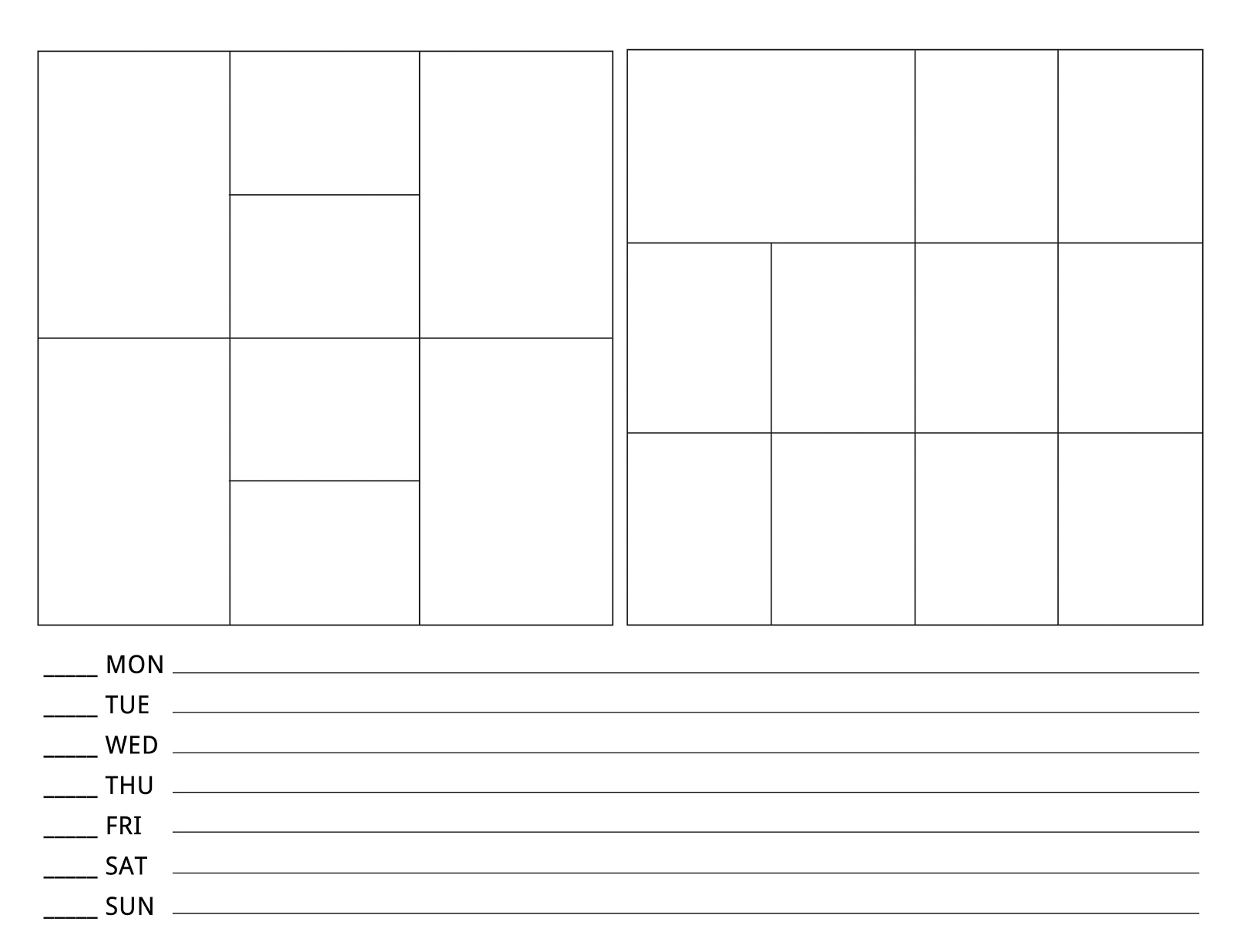
I'll be using Marcy Penner's planning sheets again this year and already laid out my pages.  I just placed the two I'm using on a single page and added some space at the bottom for my planning notes. Here they are so you can see the two pages side my side.

This is the one I'll tentatively be using for week one, the back side of Design F on the left and Design D on the right.


This is what the sheet for week two would look like, design D on the left and Design F on the right.  This is the pattern that I'm planning on repeating throughout the year.


I'm also super excited about the flip up or should I say flip out potential these two protectors can give me and I've also already figured out how to turn two 3x4 slots into a 6x4 in I needed one.

I also need to pick up an album or two as was the case last year so I need to get on making that choice too.

So since this post is massive already I'll stop here but I plan to tackle week one this weekend once my kit arrives Friday and hope to be back with both weeks one and two next Wednesday and each Wednesday again going forward.

Thanks so much for stopping by!

P.S. One thing that I felted compelled to let you know is when I provided links within my posts these are strictly to let you know what the product is and where you might find it.  I do not receive anything for these links or any compensation for them.  Just wanted to throw that out there.


Monday, January 7, 2013

Finishing up Project Life 2012

I wanted to share a few last pieces of my Project Life 2012 albums.  I never shared how I transitioned my albums (I have two for the year) so I wanted to share how I did those.

I ended volume one at the end of June.  Luckily my days lined up and the last full spread actually ended on June 30th.  I still had the backside to fill so I decided to use a full size image. I picked an image that was from June and blew it up to 12 x 12 and added some text at the bottom.  This is actually a photo I took from my phone that does appear within one of my spreads earlier in the month.  I printed this at home and I do not have a large scale printer.  All you need to do is section off the photo and then print.  These are the steps I took.
  1. Set up guides within PSE on top of your photo. I add one vertical at 6" so I know where the middle is, one horizontal at 4" and one horizontal at 8". This will help you with the next cropping step. Plus it also helps when you add text so you can space it so the words don't get cut up.
  2. Crop three times at 12x4 the top, middle and bottom sections of the photo. Save each of them.
  3. Crop each of those sections again twice at 6x4 (the left side and the right side).
  4. Print each of the 6x4 sections, you will have 6
  5. Cut the middle two photos in half so you end up with 4 3x4 pieces
  6. You will need to trim the middle 4 pieces just a bit to fit them in the slots, like less than 1/8". I trimmed the outside edge of the left and right photos and the inside edges of the two middle photos and it still lined up perfectly.
  7. You can round your corners if you wish, I opted to keep mine square.

Because I wanted my volume two to start with a full spread I added another full size photo as the into page to volume 2.  Here is that photo. It was cropped and trimmed the same way as I shared above.


I also had one last side to complete at the very end of the second volume.  I knew I wanted to summarize the year in some way and had seen this awesome example linked on a message board I believe, I'm sorry I don't remember which one.  I thought it was an amazing idea to count up what was contained within our year.  The example was used as a way to end one of her volumes so I knew my counts would be pretty high since I was doing the whole year.

I made a list of things that I knew I wanted to include and set up a list on a piece of paper.  I started with the first spread and just went down my list and counted each of these items if they were shown on that given spread.  It took me less than an hour to count everything so trust me it wasn't that daunting if you decide to do this too.  I will say that I did not count every time our faces were shown, I counted the number of slots our photos were in.  I did this because I quickly realized when I hit a collage of multiple images that counting each time our faces were shown would be too daunting.  I did the same thing for food photos, in some cases there was a collage of several images of food, I just counted each collage as one.  It still gives a really good overview of our inclusions so I'm fine with that. Feel free to make up your own rules here, just keep the rules you decide on the same for every item.


Here is what I ended up with.  Another large scale photo shifted to the left with room for my summary in numbers down the right side.


Here it is uncut so you can read it a bit better.


This really brought this project home for me.  Seeing it listed in numbers like this made me realize how full our lives were in 2012, how much we got out and how much fun we had.  It also made me realize that the number of kid less overnights definitely needs to be higher and the number of concerts, plays and sporting events could be higher too.  All things I hope to add in to our plans for 2013.

If you haven't tried adding a full size photo in your album yet, I hope my steps make it easier for you especially if you don't have a large scale printer.

I will be back on Wednesday with my plan for 2013, my first week and hopefully my finished cover page, its still a work in progress.

Wednesday, January 2, 2013

Project Life - Weeks 50, 51 & 52

It's done, like done and I'm amazed, emotional and so very grateful to have these memories documented. I have loved every minute of this, truly.

Here is week 50


This flip up as the words from the blog post I did for Simone's birthday, bottom left above.


I had to touch a bit on what happened in CT, it was so hard for me to put words down so I kept it simple, horrifying and unbelievably tragic is the best way I can sum up my feelings.  I've seen so many beautiful tributes, I so wish I could process things as well or as beautifully.


This is inside the Believe card flip up.  I made that card as part of a Tag Swap that I did in December.  It was perfect for our Polar Express night.

 
Here is week 51


And here is week 52


This week covers more than that week because the year went a bit long.  I wanted to end on the 31st so I have some bonus days in there.  I was sick for a good portion of the end of the year so it helped me squeeze it all in since I wasn't active at all.  And yes, I do believe that is the least flattering photo of myself by far this year.
 

This is the inside of the Christmas Eve flip up, bottom left above.


I found the New Year's confetti at the party store and decided to fill a slot with it and left it open to the back. I stitched it closed in rows so the confetti couldn't bunch up at the bottom.

This is the inside of the New Year's flip up, bottom right above.

 
I'm simply beyond thrilled that I did it, that I stuck with it and that its done.  I do have one last little bit to finish, the back page and I'll do that next.

I'll share that later as well as my plan for 2013!  I'm changing things up and using new protectors this year, trying to shake things up and keep them interesting.  More details to follow.

I hope you all have an amazing 2013 and I look forward to sharing more with you.